

TikTok Analytics Dashboard Guide 2026
 Emerson Tyler
02 June 2026
Emerson Tyler
02 June 2026 
TikTok in 2026 moves at lightning speed. One week, a trending sound is all over the platform, the next it seems to disappear into thin air. That’s why using a TikTok analytics dashboard is no longer optional for creators and brands trying to grow. The good news is that you don’t need to be a data scientist to figure it all out.
Tools like TikTok Studio and Metricool make analytics and reporting feel less like a chore and more like having a GPS for your content strategy. When you know what your audience enjoys, catching the perfect trend at the right time becomes so much easier.
Who Should Use a TikTok Analytics Dashboard?
Anyone trying to grow on TikTok can benefit from using analytics. Whether you are posting dance trends, product launches, tutorials, or behind-the-scenes content, analytics help you see what grabs attention and what gets scrolled past. A TikTok analytics dashboard gives you the insights needed to create smarter content instead of relying on pure luck.
You should use TikTok analytics if:
- You’re a social media manager who wants to compare performance across campaigns
- You’re a content creator looking to increase views and engagement
- You’re an influencer tracking audience growth and brand campaign performance
- You have a small business that is trying to drive website traffic or sales
- You have a marketing team that manages multiple TikTok accounts
- You run an agency that creates reports for clients
Why TikTok Analytics Matter for Growth
Growing on TikTok without looking at your TikTok analytics dashboard is a little like trying to cook without tasting the food. You might get lucky sometimes, but most of the time you don’t know what is working. When you understand what keeps viewers hooked, you can create more content that performs well with the TikTok algorithm instead of posting mindlessly and crossing your fingers.
Key Benefits of Tracking TikTok Analytics
The real magic of analytics is that they turn random content into a strategy. Instead of chasing every trend you see on your For You Page, you can focus on the formats, topics, and posting times that consistently work for your audience. Over time, this leads to stronger engagement, better conversions, and a much clearer understanding of what drives your growth.
Top benefits include:
- Discovering which videos generate the most TikTok impressions
- Identifying your best posting times
- Improving watch time and audience retention
- Tracking follower growth as well as engagement trends
- Understanding audience demographics and interests
- Measuring campaign and influencer performance
- Optimizing content strategy based on real data
- Monitoring clicks, traffic, and conversions
- Spotting trends before they hit a peak
- Creating more consistent and scalable content
Uncovering Your TikTok Analytics
Unlocking TikTok analytics is kind of like finally turning the light on in a dark room. Suddenly, you can see which content is pulling in TikTok impressions, which videos keep people watching, and what gets your target audience to interact. Instead of tossing videos into the algorithm and wishing for viral magic, you can use real insights to create content with a lot more confidence.
Switching to a TikTok Business Account
Switching to a TikTok business account allows you to unlock advanced analytics, advertising tools, and performance insights. It is easy to set up and only takes a few minutes.
Here is how you can switch your account:
- Open TikTok and go to your profile
- Tap the three-line menu in the top right corner
- Select “Settings and Privacy”
- Tap “Account”
- Choose “Switch to Business Account”
- Follow the setup prompts
- Select your business category
Where To Find Your Analytics Dashboards Inside the TikTok App
TikTok keeps your analytics inside TikTok Studio, Business Suite, or Creator Tools, depending on your account type. This is where you can monitor TikTok impressions, audience insights, engagement, and content performance on a single dashboard.
To find your analytics:
- Open your TikTok profile
- Tap the three-line menu
- Select TikTok Studio, Business Suite, or Creator Tools
- Tap “Analytics”
- Choose your reporting period
Inside your Dashboard, you can review:
- Video views and engagement
- Profile visits
- Follower growth
- Audience demographics
- Traffic sources
- Best posting times
- Top-performing videos
Understanding Native TikTok Analytics
Once you open your TikTok analytics dashboard, you’ll find a lot more than just view counts. TikTok breaks your data into several sections, each designed to answer a different question about your content. Are people finding your videos? Are they sticking around to watch? Who is engaging with your content? Analytics helps you connect those dots so you can make smarter decisions and grow your account with purpose.
Content Analytics
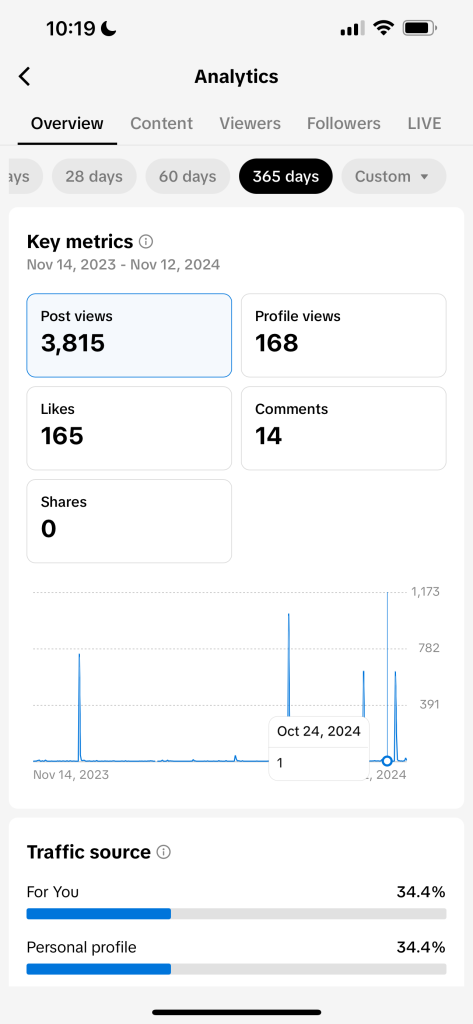
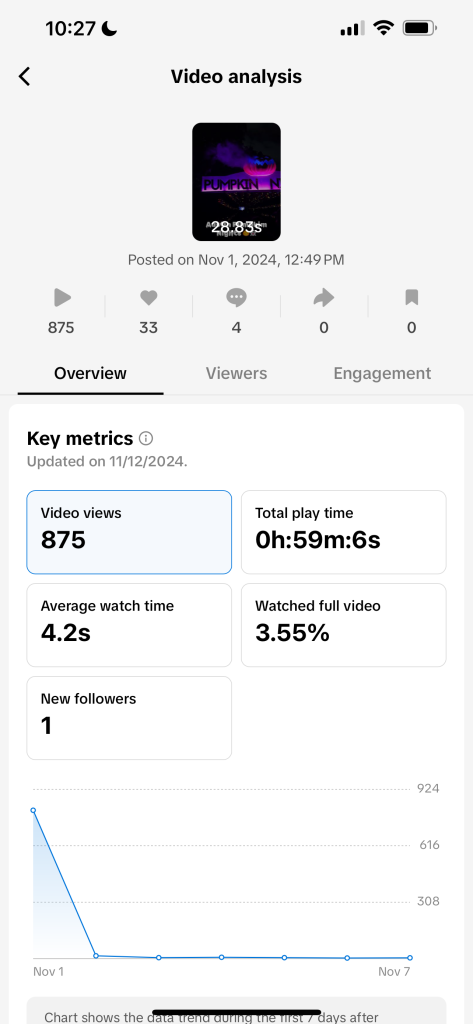
Content analytics focuses on individual video performance. If you’re trying to figure out why one video took off while another barely left the runway, this is where you’ll find the answers. By understanding these analytics, you can better optimize your content and meet your audience where they are.
Key metrics for your content analysis include:
- Top-performing videos
- Video views
- Retention rate
- Average watch time
- New viewers
- Follower growth from specific posts
- Traffic sources for individual videos
Audience & Follower Analytics
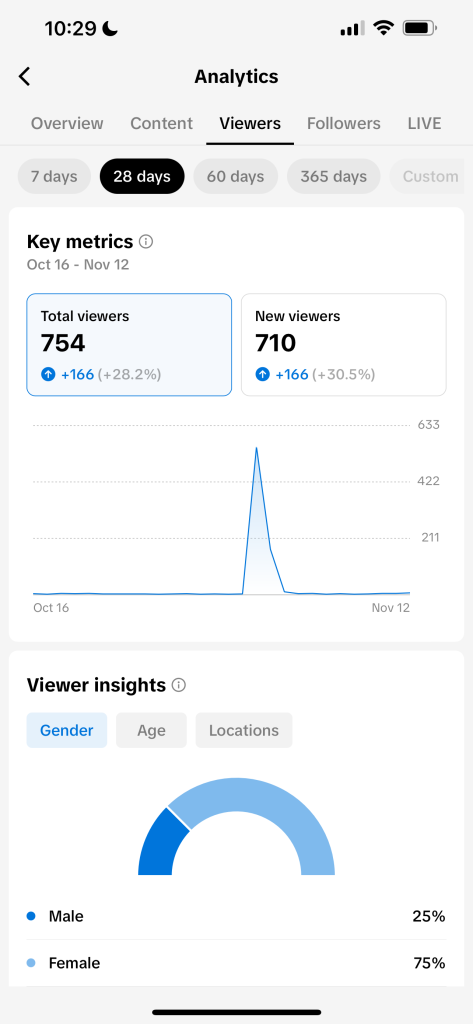
Understanding your audience is just as important as understanding your content. This section shows who is watching your videos, when they are most active, and what other content grabs their attention.
You should analyze:
- Audience demographics
- Follower demographics
- Viewer locations
- Active times by day and hour
- Related creators your audience watches
- Audience interests and viewing habits
- Follower growth trends
LIVE Analytics
If you regularly go live, TikTok provides a dedicated analytics section to measure performance and audience engagement. These insights can help you understand how effectively your live content is connecting with viewers. By amplifying your TikTok LIVE strategy, you can boost your overall engagement.
LIVE analytics includes:
- Total LIVE views
- Unique viewers
- Watch time
- Total LIVE duration
- New followers gained
- Diamonds received
- Viewer engagement metrics
Metricool TikTok Analytics
If TikTok’s native analytics feel a little scattered, Metricool brings everything into one organized location. Metricool makes it easier to track your TikTok growth, measure results, and understand what is driving engagement. From TikTok impressions and audience growth to campaign performance and conversions, Metricool helps you make faster, more informed decisions.
With Metricool, you can track:
- Top-performing videos
- Follower trends
- Likes, comments, shares, and interactions
- Average watch time
- Conversions
- Organic and paid analytics
- CPM, CPC, and CTR metrics
Metricool Studio: Build Custom TikTok Reports
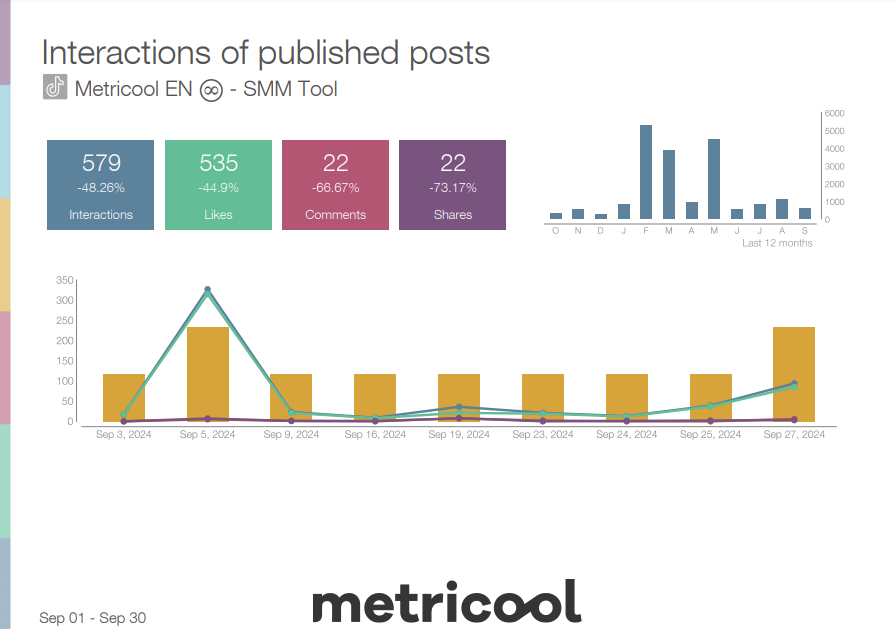
Not every marketer, creator, or agency needs to see the same metrics. That’s where Metricool Studio comes in. Metricool Studio lets you build custom TikTok analytics dashboard views without any technical skills. Simply choose the charts, metrics, and insights you want to display.
Instead of digging through reports to find the data that matters, you can organize your analytics visually and keep your most important KPIs front and center. Think of it as creating your own social media command center, tailored to the way you work. Custom dashboards help teams spend less time searching for data and more time acting on it.
These benefits include:
- Multi-brand reporting
- Faster reporting and analysis
- Cleaner presentations for clients and stakeholders
- Easier communication across teams
- Custom charts and metrics based on your goals
Campaign Dashboards for TikTok Performance Tracking
Looking at individual posts only tells part of the story. Campaign dashboards help you group TikTok content by campaign, product launch, trends, hashtags, or any initiative you’re tracking. With Metricool, content can be organized manually or automatically, making it easier to measure the impact of your efforts.
By viewing performance at the campaign level, you can see total reach, engagement, video performance, conversions, and overall ROI in one place. This gives you a clearer picture of what is driving results, helps you compare campaigns more effectively, and makes it easier to connect your content strategy to business goals.
Common TikTok Analytics Mistakes to Avoid
A TikTok analytics dashboard can provide valuable insights, but only if you’re paying attention to the right metrics. While TikTok impressions and views are important, they only tell part of the story. Looking at audience behavior, retention, and long-term trends often reveals much more about what is driving growth.
Common mistakes to avoid include:
- Focusing only on views and TikTok impressions
- Ignoring watch time and retention metrics
- Looking at performance in isolation instead of tracking trends over time
- Overlooking audience demographics and behavior
- Not identifying your best posting times
- Comparing individual posts without evaluating campaign performance
- Failing to benchmark results against previous campaigns
- Making content decisions based on assumptions instead of data
TikTok Analytics FAQs
How do I see my analytics on TikTok?
You can access analytics by switching to a Business or Creator account and going to Profile → Menu → Creator Tools → Analytics. You can also monitor your TikTok performance with social management tools like Metricool. These tools provide deeper insights, comparisons, and reporting capabilities to help you analyze your growth more easily.
What metrics should I monitor on TikTok?
Key metrics to pay attention to on TikTok include views, likes, comments, shares, watch time, average view duration, and follower activity. These help you evaluate engagement and guide your content strategy.
Why are TikTok analytics important?
TikTok analytics show what works and what doesn’t, helping you improve your content over time. They also guide posting schedules, trending topics, and audience behavior.
Can TikTok analytics help me grow my account?
Yes, TikTok analytics help you grow your account. Using analytics helps you identify patterns, optimize your content, and make data-driven decisions, all of which lead to better reach and growth.
How often should I check my TikTok analytics?
You should review your TikTok analytics at least once or twice a week to track performance trends. Regular check-ins enable you to adjust your content strategy quickly and stay aligned with your audience’s preferences.
Turn Your TikTok Data Into Smarter Growth With Metricool
A TikTok analytics dashboard is more than a collection of metrics. It helps you understand what drives TikTok impressions, engagement, and growth so you can make smarter content decisions. With Metricool, you can track performance, build custom reports, and analyze campaigns from one place. Are you ready to stop guessing and start growing? Try Metricool today!
